Showing posts with label github. Show all posts

2011-07-05

Optimized SVGs at gist.github.com

Lately, I've been having a lot of fun hand optimizing SVG files for size, a bit like Sam Ruby does for his blog (it is highly instructive peeking at his collection, as I think I have mentioned before).

For me, SVG has something of the magical flair I first found in HTML in the nineties, back when it was the new bleeding edge New Thing, but I argue that it's even more fun than HTML was. The W3C SVG specs are not prohibitively difficult to read, and of course you have much greater graphical freedom than structured documents can afford you (duh!).

Like Sam, I try for something presentable in a kilobyte or less (uncompressed, though modern good browsers are as happy to render SVG:s delivered with content-encoding: gzip, of course, as long as they are otherwise correct and delivered with an image/svg or image/svg+xml content-type), and to never enforce a fix width in the svg tag itself – so they just beautifully grow to any size you want them to be, with no loss of quality.

Which is the other main beauty of SVG, besides being fly-weight, standardized, widely supported and still growing broader support in all the main-stream browsers. Over the last few years, the SVG front has been progressing happily and now is very practically useful already, for at least those of us that care most about Chrome, Firefox and Opera (I get the perception that Opera's often rather exceptional lead on the SVG support front is largely or even solely the work of Erik Dahlström, but I might exaggerate a bit).

[I thought what I'd do was, I'd pretend I was one of those deaf-mutes] (<- this is text content in an inline SVG, if your browser or reader has stripped off the SVG or can't render such modernisms :-) Anyway, this weekend, I had fun turning the Laughing Man (from Ghost in the Shell: Stand Alone Complex) that @elmex vectorized at some point, into a 1000 byte version of my own, also featuring the gentle rotating text seen in the anime series (YouTube), via declarative animation (so there is no javascript involved here).

Edit: I initially missed an excellent opportunity here to plug Jeff Schiller's scour, which is an ideal first step when you start from an SVG source file. Be sure to run with -p something-large, as its defaults are being lossy about precision, which cuts needed decimals from some input files. With -p 99 you'll be on the safe side. Experiment with low single-digit numbers if you like (the current default – 5 – is often good), but make sure things are still looking right, or you may just ruin your file, rather than optimizing it for tiny foot-print. Broken images don't get extra credit for also being small!

The result is in this gist (if you install this user script, you can swap between *.svg text/plain source code image/svg rendition) or to the left, if your browser renders inline SVG:s properly in HTML content (I recommend the gist over view source, as Blogger inserts linebreak HTML tags unless I strip out all newlines first).

What surprised me, when I made this user script, is how far standards support has come in modern browsers: in order to inject the <svg> tag I create for the rendered version, I had to feed the source through DOMParser (as setting .innerHTML is lossy from treating the SVG content as text/html, not text/xml), and the few lines doing that, just magically worked in all of Chrome, Firefox 4 and Opera 11 (de-jQuery:fied, to make more sense outside of the script's context) with no special extra effort on my part:
// turn the raw SVG source string into an XML document:
svg = (new DOMParser).parseFromString(svg, 'text/xml');

// import it into an SVGSVGElement in this document:
svg = document.importNode(svg.documentElement, true);

// and insert that element somewhere in the document:
document.body.appendChild(svg);
To me, that's a rather clear sign SVG is ready for prime time now.

While github reports having no plans on serving *.svg gists with an image content-type (they don't want people using gists for image hosting, I guess, even though it's sad you can't easily preview without saving to disk or using my hack above) I still think the light-weight gist community oriented sharing is good for this kind of thing. Others happily forked the octocat SVG I similarly format converted a while ago from the github About page, and milligramme made this much spacier version.

I gather all my SVG play in a svg-cleanups repository on github, if anyone wants to get inspired the fork or follow way, and occasionally tweet about it. If you find this kind of exercise as much fun, I love hearing about it; here, on Twitter, github, or elsewhere. I believe it's good teaching and learning for the web as a whole, too. Any logos, trademarks and the like above are property of their respective owners.

2011-06-04

Draw your own Github SVGs, step by step

I SVG:ified and played a little further with the logo material from the recently published Github about page, and then tonight I figured it would be fun to visualize the elegant process by which a raw SVG image is built up, piece by piece, by rather basic building blocks. With just a little bit of javascript magic to help you, here is how you piece together your own github schwag from scratch (works like a charm in Chrome, Firefox 4, and presumably any other modern browser that can handle inline SVG images):


If all you see is a button and the description of each step, that just means your browser doesn't natively handle inline SVG, which of course is a bit of a shame. Another reason I was curious to try this is for seeing how inline SVG:s fare in feed readers. (Google Reader seems to fail.)

Nicer source code for the images than in the page (Blogger insisted on filling all the whitespace with html junk) in these gists: github-logo.svg, octocat.svg. gist.github.com currently doesn't serve .svg files as image/svg, so you'll have to save them locally first to see them rendered.

Source code for the step-by-step drawing is in this gist; MIT licensed, if you want to fork away, adopt, adapt or whatnot. Have fun! I did. :-)

2011-05-28

Github Improved 1.7

After a whole year in development as a user script (initial mention, formerly known as "Github: unfold commit history"), a brief test-drive as an Opera extension at the 2010 add-on con, I finished up the missing bits and pieces to make today's Github Improved! chrome extension available in the Chrome Gallery / Web Store (1.7 now also available in the Opera extension gallery).

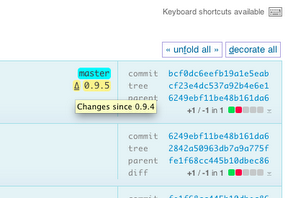
New since last release is the little tag delta (Δ) links that let you instantly see what happened between, say, Greasemonkey 0.9.5 and the previous release tag (it recognizes anything where the only thing differing between tags are their numeric parts, which also means it's not going to handle fancy 1.6rc1 type tag names littered with semantic non-numeric parts):


And, as prior users may find even more importantly, that it doesn't hog any shifted keyboard shortcuts, which for some reason had the side effect of making arrow up pull in a pageful of diffs.

Full documentation of all features, and a few screenshots, is available on the Chrome Web Store page. I also take every opportunity to mention that it really shines best together with the AutoPatchWork extension, or something equivalent which unfolds the commit history pagination as you scroll off page. Enjoy!

2010-08-23

Friendlier github commits pages

I figured I should announce the news of a much improved github commits page I have been tinkering with for a while, that lets you unfold full details about commits (individually, or in batch) without leaving the page. A screenshot of what the Greasemonkey master branch commits might look like with a few unfolded:

screenshot of github commits page with the user script active

Usage is intuitive; just click anywhere in a commit that isn't already a link, and the commit will load in place (unless already loaded) and unfold its whole changeset, or refold itself again, when clicked a second time. Similarly, individual files changed can be folded and unfolded much the same way, though only by clicking their headers (I often want to copy and paste stuff from diffs, so no click magic there). To unfold or refold every commit on the page, either hit "f", or click the "(un)fold all commits" link at the top or bottom right of the page.

This user script (install link, userscript.org page with docs and complete change log) is incidentally compatible with extensions like AutoPagerize too, in case you prefer scrolling for content to finding and clicking "Older" (h) and "Newer" (l). And if you just want to try it out without installing anything, try this bookmarklet on any github commits page.

And it's all done by a hundred lines of jQuery, about a dozen lines of css and another dozen lines of Greasemonkey / Chrome portability code that breaks out of their respective sandbox environments to run what the script needs to run in the context of the web page itself.

That latter piece is useful too, by the way, modeled on a trick Anthony Lieuallen came up with for the Greasemonkey wiki at some point. This is what it looks like, including full docs:


The above-referred jQuery is already loaded by github's page template, so I don't need to bother grabbing or shipping one of my own. If you are hacking a more hostile site, and run Greasemonkey you might want to add a // @require http://ajax.googleapis.com/ajax/libs/jquery/1.4.2/jquery.min.js line to your script header instead (I haven't tested, but if you try to run jQuery in the mozilla javascript sandbox anything beyond really basic stuff fails due to the common pitfalls that jQuery, sanely, does not much attempt to evade).

All above code is freely poachable (read: MIT license) at github, with as much or little attribution as you like. I would of course be especially happy to see the github people adopt this for their default page templates, as it's really useful stuff. Share and enjoy!