Webby thoughts, most about around interesting applications of ecmascript in relation to other open web standards. I live in Mountain View, California, and spend some of my spare time co-maintaining Greasemonkey together with Anthony Lieuallen.
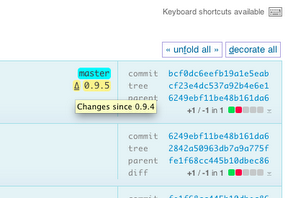
New since last release is the little tag delta (Δ) links that let you instantly see what happened between, say, Greasemonkey 0.9.5 and the previous release tag (it recognizes anything where the only thing differing between tags are their numeric parts, which also means it's not going to handle fancy 1.6rc1 type tag names littered with semantic non-numeric parts):
And, as prior users may find even more importantly, that it doesn't hog any shifted keyboard shortcuts, which for some reason had the side effect of making arrow up pull in a pageful of diffs.
Full documentation of all features, and a few screenshots, is available on the Chrome Web Store page. I also take every opportunity to mention that it really shines best together with the AutoPatchWork extension, or something equivalent which unfolds the commit history pagination as you scroll off page. Enjoy!
I figured I should announce the news of a much improved github commits page I have been tinkering with for a while, that lets you unfold full details about commits (individually, or in batch) without leaving the page. A screenshot of what the Greasemonkey master branch commits might look like with a few unfolded:
Usage is intuitive; just click anywhere in a commit that isn't already a link, and the commit will load in place (unless already loaded) and unfold its whole changeset, or refold itself again, when clicked a second time. Similarly, individual files changed can be folded and unfolded much the same way, though only by clicking their headers (I often want to copy and paste stuff from diffs, so no click magic there). To unfold or refold every commit on the page, either hit "f", or click the "(un)fold all commits" link at the top or bottom right of the page.
This user script (install link, userscript.org page with docs and complete change log) is incidentally compatible with extensions like AutoPagerize too, in case you prefer scrolling for content to finding and clicking "Older" (h) and "Newer" (l). And if you just want to try it out without installing anything, try this bookmarklet on any github commits page.
And it's all done by a hundred lines of jQuery, about a dozen lines of css and another dozen lines of Greasemonkey / Chrome portability code that breaks out of their respective sandbox environments to run what the script needs to run in the context of the web page itself.
That latter piece is useful too, by the way, modeled on a trick Anthony Lieuallen came up with for the Greasemonkey wiki at some point. This is what it looks like, including full docs:
The above-referred jQuery is already loaded by github's page template, so I don't need to bother grabbing or shipping one of my own. If you are hacking a more hostile site, and run Greasemonkey you might want to add a // @require http://ajax.googleapis.com/ajax/libs/jquery/1.4.2/jquery.min.js line to your script header instead (I haven't tested, but if you try to run jQuery in the mozilla javascript sandbox anything beyond really basic stuff fails due to the common pitfalls that jQuery, sanely, does not much attempt to evade).
All above code is freely poachable (read: MIT license) at github, with as much or little attribution as you like. I would of course be especially happy to see the github people adopt this for their default page templates, as it's really useful stuff. Share and enjoy!