AdBlock Plus seems to be a new name for the same (well, or a later version of the) AdBlock plugin I learned to love. If it is under new maintainership or just got a fine new Plus piggybacked for coming of age, which in this case means maturing even further, I don't know, and the home page didn't much enlighten me, either. But it's still outstanding. And with the addition of the Adblock Filterset.G Updater, you don't even have to do most of the work of clicking away ads that annoy you.
Using Mozilla is still the "spoiling yourself silly" experience. I like that in a browser.
2005-10-29

Console² -- the better still Mozilla error console
What I didn't notice in my last post, but should have, was Console² (Mozilla 1.5 or later only), which did just what I was looking for, and more, in about the style I had been hoping for. It plays nice with Console Filter too, as you can see in the screen shots below:
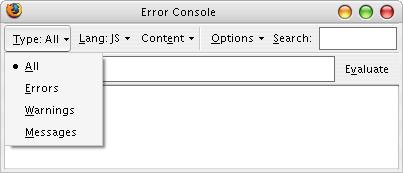
(I suppose we've seen those before, yes.)
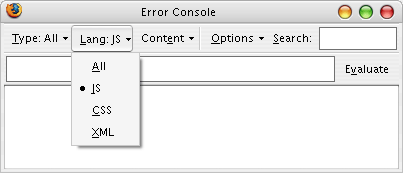
Ooo! Now we're talking!
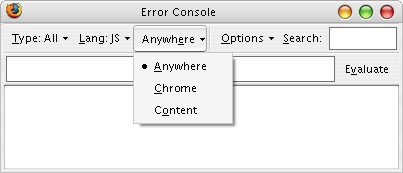
*nods vigorously*
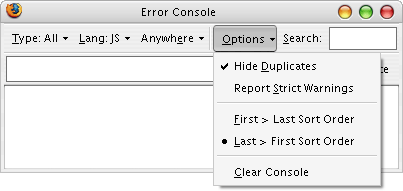
Yes! No more scrolling to death to find the most recent entries, either. Thanks!
I wonder when this extension will enter Mozilla proper, rather than being a sideshow we have to dig up for ourselves. Well, I'm happy about having found it, and thought I ought to spread the word as best I can.
(I suppose we've seen those before, yes.)
Ooo! Now we're talking!
*nods vigorously*
Yes! No more scrolling to death to find the most recent entries, either. Thanks!
I wonder when this extension will enter Mozilla proper, rather than being a sideshow we have to dig up for ourselves. Well, I'm happy about having found it, and thought I ought to spread the word as best I can.
2005-10-28
Relief from noisy Mozilla 1.5 console
Ever since I laid hands on my first Mozilla 1.5 beta and couldn't bring myself to switching back (due to the excellent improvements to GreaseMonkey, requiring 1.5), I have been wading through the deep trenches of street CSS the web is infested with. It's of course no news that the web is a dirty place full of ill wrought markup; humans make mistakes, and not half of them know about it, and an even tinier percentile care. After all, a browser is supposed to do a decent job of grokking even broken code, and they often do.
The news was that the Javascript Console in Mozilla started spewing out any hint of a mistake, and styling targeting other browsers, with different perceptions about what can or should be done through CSS, and all sorts of things beyond your reach, and of infinitessimal interest. It was just painful, trying to use the console to sift out your own mistakes from all the background noise of all other windows and tabs full of your average web cruft.
Error: Unknown property 'SCROLLBAR-FACE-COLOR'. Declaration dropped.
Source File: http://helgon.net/CSS/2.css
Line: 3
Error: Unknown property 'SCROLLBAR-HIGHLIGHT-COLOR'. Declaration dropped.
Source File: http://helgon.net/CSS/2.css
Line: 4
Error: Unknown property 'SCROLLBAR-SHADOW-COLOR'. Declaration dropped.
Source File: http://helgon.net/CSS/2.css
Line: 5
Error: Unknown property 'SCROLLBAR-3DLIGHT-COLOR'. Declaration dropped.
Source File: http://helgon.net/CSS/2.css
Line: 7
Error: Unknown property 'SCROLLBAR-ARROW-COLOR'. Declaration dropped.
Source File: http://helgon.net/CSS/2.css
Line: 8
Error: Unknown property 'SCROLLBAR-TRACK-COLOR'. Declaration dropped.
Source File: http://helgon.net/CSS/2.css
Line: 9
Error: Unknown property 'SCROLLBAR-DARKSHADOW-COLOR'. Declaration dropped.
Source File: http://helgon.net/CSS/2.css
Line: 11
Error: Error in parsing value for property 'padding-top'. Declaration dropped.
Source File: http://www.blogger.com/css/navbar/main.css
Line: 20
Error: Unknown property '_border'. Declaration dropped.
Source File: http://www.blogger.com/css/navbar/main.css
Line: 26
Error: Unknown property '_display'. Declaration dropped.
Source File: http://www.blogger.com/css/navbar/main.css
Line: 27
Error: Unknown property '_margin-top'. Declaration dropped.
Source File: http://www.blogger.com/css/navbar/main.css
Line: 42
Error: Error in parsing value for property 'display'. Declaration dropped.
Source File: http://www.google.com/ig
Line: 3
Error: Error in parsing value for property 'cursor'. Declaration dropped.
Source File: http://www.google.com/ig
Line: 3
Error: Unknown property 'style'. Declaration dropped.
Source File: http://www.google.com/ig
Line: 3
Error: Error in parsing value for property 'vertical-align'. Declaration dropped.
Source File: http://www.google.com/ig
Line: 3
Error: Error in parsing value for property 'width'. Declaration dropped.
Source File: http://www.google.com/ig
Line: 3
Error: Selector expected. Ruleset ignored due to bad selector.
Source File: http://www.google.com/ig
Line: 3
Error: Unexpected end of file while searching for closing } of invalid rule set.
Source File: http://www.google.com/ig
Line: 4
Error: Selector expected. Ruleset ignored due to bad selector.
Source File: http://www.google.com/ig
Line: 20
Error: Unexpected end of file while searching for closing } of invalid rule set.
Source File: http://www.google.com/ig
Line: 21
And so on and so forth. Luckily, relief is to be found, in the blessed Console Filter extension, which at least lets you get rid of most of this junk painlessly.
My quick recipe: Download, install, restart browser,
The news was that the Javascript Console in Mozilla started spewing out any hint of a mistake, and styling targeting other browsers, with different perceptions about what can or should be done through CSS, and all sorts of things beyond your reach, and of infinitessimal interest. It was just painful, trying to use the console to sift out your own mistakes from all the background noise of all other windows and tabs full of your average web cruft.
Error: Unknown property 'SCROLLBAR-FACE-COLOR'. Declaration dropped.
Source File: http://helgon.net/CSS/2.css
Line: 3
Error: Unknown property 'SCROLLBAR-HIGHLIGHT-COLOR'. Declaration dropped.
Source File: http://helgon.net/CSS/2.css
Line: 4
Error: Unknown property 'SCROLLBAR-SHADOW-COLOR'. Declaration dropped.
Source File: http://helgon.net/CSS/2.css
Line: 5
Error: Unknown property 'SCROLLBAR-3DLIGHT-COLOR'. Declaration dropped.
Source File: http://helgon.net/CSS/2.css
Line: 7
Error: Unknown property 'SCROLLBAR-ARROW-COLOR'. Declaration dropped.
Source File: http://helgon.net/CSS/2.css
Line: 8
Error: Unknown property 'SCROLLBAR-TRACK-COLOR'. Declaration dropped.
Source File: http://helgon.net/CSS/2.css
Line: 9
Error: Unknown property 'SCROLLBAR-DARKSHADOW-COLOR'. Declaration dropped.
Source File: http://helgon.net/CSS/2.css
Line: 11
Error: Error in parsing value for property 'padding-top'. Declaration dropped.
Source File: http://www.blogger.com/css/navbar/main.css
Line: 20
Error: Unknown property '_border'. Declaration dropped.
Source File: http://www.blogger.com/css/navbar/main.css
Line: 26
Error: Unknown property '_display'. Declaration dropped.
Source File: http://www.blogger.com/css/navbar/main.css
Line: 27
Error: Unknown property '_margin-top'. Declaration dropped.
Source File: http://www.blogger.com/css/navbar/main.css
Line: 42
Error: Error in parsing value for property 'display'. Declaration dropped.
Source File: http://www.google.com/ig
Line: 3
Error: Error in parsing value for property 'cursor'. Declaration dropped.
Source File: http://www.google.com/ig
Line: 3
Error: Unknown property 'style'. Declaration dropped.
Source File: http://www.google.com/ig
Line: 3
Error: Error in parsing value for property 'vertical-align'. Declaration dropped.
Source File: http://www.google.com/ig
Line: 3
Error: Error in parsing value for property 'width'. Declaration dropped.
Source File: http://www.google.com/ig
Line: 3
Error: Selector expected. Ruleset ignored due to bad selector.
Source File: http://www.google.com/ig
Line: 3
Error: Unexpected end of file while searching for closing } of invalid rule set.
Source File: http://www.google.com/ig
Line: 4
Error: Selector expected. Ruleset ignored due to bad selector.
Source File: http://www.google.com/ig
Line: 20
Error: Unexpected end of file while searching for closing } of invalid rule set.
Source File: http://www.google.com/ig
Line: 21
And so on and so forth. Luckily, relief is to be found, in the blessed Console Filter extension, which at least lets you get rid of most of this junk painlessly.
My quick recipe: Download, install, restart browser,
Ctrl+L, about:config, press <enter>, double click extensions.consolefilter.categories to true, Ctrl+Shift+J, Ctrl+K, type @js -chrome:// and press <enter> again to turn on only non-chrome related, javascript, problems. Sit back and relax. Breathe freely. Finally a useful Mozilla 1.5 again for disturbance free web development.2005-10-27
Smooth scrolling between anchors
I found an old article about making in-page links smooth scroll today. Neat idea. It could be developed further, though, I thought, and hacked at it for a while. Then the idea of making a GreaseMonkey script out of it struck me, and a while later it was all done. Smooth scroll when clicking in-page links (userscripts.org copy here for safe-keeping) seems to work well enough too.
I experience some odd behaviour with the Mozilla 1.5 release candidate build from a few hours ago, though; the back button doesn't react when clicked on, after having clicked through an in-page link or a few, though the history object gets updated properly (and a javascript:void history.back() scriptlet still works as it should). It's just the back button proper that doesn't. It doesn't even get clickable when I follow an #in-page link. Fishy.
I experience some odd behaviour with the Mozilla 1.5 release candidate build from a few hours ago, though; the back button doesn't react when clicked on, after having clicked through an in-page link or a few, though the history object gets updated properly (and a javascript:void history.back() scriptlet still works as it should). It's just the back button proper that doesn't. It doesn't even get clickable when I follow an #in-page link. Fishy.
2005-10-25
Blogger hack: inline comment faces
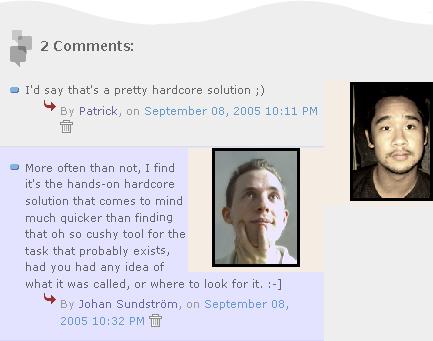
It's nice seeing who is talking to you, and the comment faces on blogger comment pages are a nice touch. So we would expect to see them when inlining the comments in our blogs too, right?
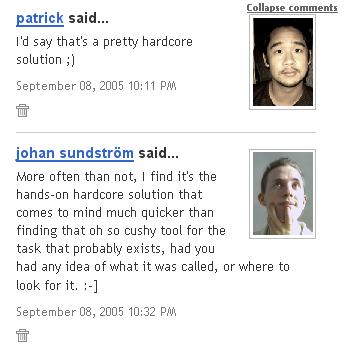
Wrong! Because, for some reason, no template tag exports commenter profile images to us. It sucks to want that, under such circumstances. And since the Blogger profiles are served from www.blogger.com and our blog pages are not, we can't do anything about circumventing this through means of AJAXing profile the pages to parse out the image URLs, either.
But what we can do, is show the whole profile pages to our visitors in
First off, you want to save your current template. Who knows, you might decide you liked it better this way, or you might end up ruining something -- and since nobody will be able to restore it afterward but yourself, this is the time to help the future you. Paste it into your favourite editor (or Notepad), and save it on disk somewhere.
Hint: don't get back to your browser now to edit it now; instead, save the template again under a new name, and keep editing it with a Real Editor. This is a very good habit, both since browsers typically lack the good editing facilities editors don't, and since browsers have more of a tendency of suddenly doing bad things, at least in my experience.
Now, let's dig up the part of our template where user comments go. Mine looked like this before I started (yours might not be exactly the same, but feel free to copy the layout of mine when it's done, if you are not fluent with HTML):
Now, let's add a spot where our commenter's face goes, and another tiny bit that we'll come to need in a few moments:
Let's style this. In the
The second class description defines another div tag inside the comment-head div, which we will be adding dynamically with javascript, for the purpose of clipping away the non-face portions of the profile, as best we can. (In theory, we ought to have been able to add this div to the static parts of the template, but I experienced some buggy behaviour with ghost text appearing in my firefox beta using that method.)
The rest, we will do with javascript. I will start off with one very useful method the Document Object Model still somehow lacks, but which we can mimic ourselves:
And, using this tool, we now build
Now it's time for the real action; tuck in this function after the above methods:
This will track down all comment-head divs, find the URL to the person who wrote the comment (hence the commented-by class, to find them) and add a face-clipper div with a profile iframe inside. The extra attributes there make sure it doesn't get any ugly borders, scrollbars and whatnot, and we don't need it any bigger than the dimensions listed to find the face. In case the commenter was not a blogger user, we simply skip adding the extra tags.
To have make this work, in case your comment markup looked any differently, let's backtrack to the HTML code a little and look carefully at the bold bits in the HTML and in this piece of code; we need to match them up properly, or things will not work. We must make sure that the commented-by class name is set on the first tag surrounding the
If you want to be really sure, you can make the
There is only one thing left now: invoke the code from somewhere. I prefer doing it with an onload handler, so the comment faces don't get loaded until all the rest of the page has been fetched. Find the
You're done! Enjoy!
Wrong! Because, for some reason, no template tag exports commenter profile images to us. It sucks to want that, under such circumstances. And since the Blogger profiles are served from www.blogger.com and our blog pages are not, we can't do anything about circumventing this through means of AJAXing profile the pages to parse out the image URLs, either.
But what we can do, is show the whole profile pages to our visitors in
<iframe> tags. Or, let's say, a portion of it, around the spot where user images go. It's a very ugly kludge, but it's an ugly problem, too. Fortunately for us, Blogger profile pages are quite static and predictable in how they position the profile owner's image. All right, so it's doable -- let's get down to business!First off, you want to save your current template. Who knows, you might decide you liked it better this way, or you might end up ruining something -- and since nobody will be able to restore it afterward but yourself, this is the time to help the future you. Paste it into your favourite editor (or Notepad), and save it on disk somewhere.
Hint: don't get back to your browser now to edit it now; instead, save the template again under a new name, and keep editing it with a Real Editor. This is a very good habit, both since browsers typically lack the good editing facilities editors don't, and since browsers have more of a tendency of suddenly doing bad things, at least in my experience.
Now, let's dig up the part of our template where user comments go. Mine looked like this before I started (yours might not be exactly the same, but feel free to copy the layout of mine when it's done, if you are not fluent with HTML):
<BlogItemComments>
  <li><a name="c<$BlogCommentNumber$>"></a>
    <div class="comment-body">
      <p><$BlogCommentBody$></p>
    </div>
    <p class="comment-data">By <$BlogCommentAuthor$>, on
      <a href="#c<$BlogCommentNumber$>">
        <$BlogCommentDateTime$>
      </a><$BlogCommentDeleteIcon$>
    </p>
  </li>
</BlogItemComments>
Now, let's add a spot where our commenter's face goes, and another tiny bit that we'll come to need in a few moments:
<BlogItemComments>
  <li><a name="c<$BlogCommentNumber$>"></a>
    <div class="comment-head"></div>
    <div class="comment-body">
      <p><$BlogCommentBody$></p>
    </div>
    <p class="comment-data commented-by">By <$BlogCommentAuthor$>, on
      <a href="#c<$BlogCommentNumber$>">
        <$BlogCommentDateTime$>
      </a><$BlogCommentDeleteIcon$>
  </li>
</BlogItemComments>
Let's style this. In the
<style type="text/css"> tag far up in the template, we'll mark the facial territory, setting it up to be 136 by 124 pixels (I did some trial and error measuring, and this seems to work fairly well at least for me) and go on the right:.comment-head {
overflow:hidden;
height:124px;
width:136px;
float:right;
padding:0;
margin:0;
}
.face-clipper {
margin-left:-32px;
margin-top:-126px;
overflow:hidden;
height:250px;
width:168px;
}The second class description defines another div tag inside the comment-head div, which we will be adding dynamically with javascript, for the purpose of clipping away the non-face portions of the profile, as best we can. (In theory, we ought to have been able to add this div to the static parts of the template, but I experienced some buggy behaviour with ghost text appearing in my firefox beta using that method.)
The rest, we will do with javascript. I will start off with one very useful method the Document Object Model still somehow lacks, but which we can mimic ourselves:
document.getElementsByClassName(). Mine takes two parameters: the class name and an optional tag name, which further limits the returned node set to elements of the appropriate kind. Just to be kind to really old, crummy Internet Explorers which lack the document.getElementsByTagName, which the DOM does have in all modern browsers, let's start with cooking our own, as needed; I suggest putting this bit in your <head> tag, somewhere far up in the beginning of your template:<script type="text/javascript"><!--
if( document.all && !document.getElementsByTagName )
document.getElementsByTagName = function( nodeName )
{
if( nodeName == '*' ) return document.all;
var result = [], rightName = new RegExp( nodeName, 'i' ), i;
for( i=0; i<document.all.length; i++ )
if( rightName.test( document.all[i].nodeName ) )
result.push( document.all[i] );
return result;
};
--></script>
And, using this tool, we now build
document.getElementsByClassName() too (add this before the last line with the closing tag above):document.getElementsByClassName = function( className, nodeName )
{
var result = [], tag = nodeName||'*', node, seek, i;
var rightClass = new RegExp( '(^| )'+ className +'( |$)' );
seek = document.getElementsByTagName( tag );
for( i=0; i<seek.length; i++ )
if( rightClass.test( (node = seek[i]).className ) )
result.push( seek[i] );
return result;
};
Now it's time for the real action; tuck in this function after the above methods:
function showFaces()
{
  var comments, comlinks, i, node, re, by;
  re = new RegExp( '^http://www.blogger.com/profile/\\d+', 'i' );
  comments = document.getElementsByClassName( 'comment-head', 'div' );
  comlinks = document.getElementsByClassName( 'commented-by' );
  for( i=0; i<comments.length; i++ )
  {
    by = comlinks[i].getElementsByTagName( 'a' ).item( 0 );
    if( !by || !re.test( by.href ) ) continue;
    node = document.createElement( 'div' );
    node.className = 'face-clipper';
    node.innerHTML = '<iframe width="200" height="250" src="' +
      by.href + '" frameborder="0" scrolling="no" />';
    comments[i].appendChild( node );
  }
}
This will track down all comment-head divs, find the URL to the person who wrote the comment (hence the commented-by class, to find them) and add a face-clipper div with a profile iframe inside. The extra attributes there make sure it doesn't get any ugly borders, scrollbars and whatnot, and we don't need it any bigger than the dimensions listed to find the face. In case the commenter was not a blogger user, we simply skip adding the extra tags.
To have make this work, in case your comment markup looked any differently, let's backtrack to the HTML code a little and look carefully at the bold bits in the HTML and in this piece of code; we need to match them up properly, or things will not work. We must make sure that the commented-by class name is set on the first tag surrounding the
<$BlogCommentAuthor$> tag. (In my example, this was on a <p> tag. Now, starting there, we count how many <a> tags there are between the start of this tag and the <$BlogCommentAuthor$> tag; zero, in my example. This number goes in the item() ellipsis. (In case you have any other magic Blogger tags that expand to <a> tags, count those too.) If you get the number wrong, there won't be any faces at all, because the code will skip all comments, figuring they were not links to blogger users.If you want to be really sure, you can make the
<$BlogCommentAuthor$> tag into a <span class="commented-by"> <$BlogCommentAuthor$> </span> construct, and keep the zero from my example. Just don't have the commented-by class name in any more than one place in the HTML.There is only one thing left now: invoke the code from somewhere. I prefer doing it with an onload handler, so the comment faces don't get loaded until all the rest of the page has been fetched. Find the
<body> tag and add our code, making it <body onload="showFaces();"> instead. Try the template, save it and republish your blog.You're done! Enjoy!
Thoughts on cross-blog commentary
Blogging on the open web today still have a few shortcomings that some closed blogging communities have overcome: comments, and threads spawned from comment discussions are seldom threaded, and seldom leverage the exchange of ideas and developing topics at any depth; it's more of a hit-and-run business. You drop a few words, perhaps a link or two pointing to something you want to refer to, and then you essentially hang up.
If your comment ever gets any attention, it's most likely through some other channel -- mail, or a note in your own blog -- that does not end up visible to other visitors who got interested in your exchange, or at least not where they are likely to ever find it. This is of course not ideal. I'd like to change that. This probably takes some architectural thinking and innovation. And, if it is to change anything substantially, it must be really easy too for the end user. Easier than trackbacks. Of course it's a difficult problem, but it's one worth solving. Being Blogger might be one place to start; after all, that is one possible vector at solving part of the problem, between blogger members. It's always easier if you have some level of control of both ends that meet.
Another feature often found in more or less centrally organized web communities is the back tracking option of reading up on what someone has posted, in other threads, through a specialized comment search facility or a link from the user's profile. I often feel I would like the same thing on the chaotic web, too -- maybe as an opt-in system, where each commenting opportunity also offers you the choice of trackability or not; essentially whether your comment will end up on your "my comments on the rest of the world" roster.
I've started brewing ideas on how to implement the latter, again starting with Blogger (and perhaps HaloScan), with some client side support from a GreaseMonkey userscript you install (since I am no Blogger tech in a position to develop this on their comment form directly). When you visit a blogger comment form, it adds a check box "Add this comment to your comments list" that is checked by default, and stores a permalink to your comment on a central server when you post it.
Add some support on the central server to pull in all of your comments to some page of yours and format them however you want, for instance like the deli.cio.us JSON feeds, and we would be up and running. I will probably look in to making an application along these lines at the Ning playground (a free hosting place for developing social applications with some nifty supporting back-end architecture).
Might be a good idea to add some kind of tagging features to the concoction, too, so you can pull in your comments as RSS feeds by topic, as well, so tech commentary doesn't get mixed up with personal relations comments unless you really want them to.
Your own thoughts, dreams and wishes are of great interest, of course; I'm not likely to come up with even all of the obvious thoughts and ideas on my own. :-)
If your comment ever gets any attention, it's most likely through some other channel -- mail, or a note in your own blog -- that does not end up visible to other visitors who got interested in your exchange, or at least not where they are likely to ever find it. This is of course not ideal. I'd like to change that. This probably takes some architectural thinking and innovation. And, if it is to change anything substantially, it must be really easy too for the end user. Easier than trackbacks. Of course it's a difficult problem, but it's one worth solving. Being Blogger might be one place to start; after all, that is one possible vector at solving part of the problem, between blogger members. It's always easier if you have some level of control of both ends that meet.
Another feature often found in more or less centrally organized web communities is the back tracking option of reading up on what someone has posted, in other threads, through a specialized comment search facility or a link from the user's profile. I often feel I would like the same thing on the chaotic web, too -- maybe as an opt-in system, where each commenting opportunity also offers you the choice of trackability or not; essentially whether your comment will end up on your "my comments on the rest of the world" roster.
I've started brewing ideas on how to implement the latter, again starting with Blogger (and perhaps HaloScan), with some client side support from a GreaseMonkey userscript you install (since I am no Blogger tech in a position to develop this on their comment form directly). When you visit a blogger comment form, it adds a check box "Add this comment to your comments list" that is checked by default, and stores a permalink to your comment on a central server when you post it.
Add some support on the central server to pull in all of your comments to some page of yours and format them however you want, for instance like the deli.cio.us JSON feeds, and we would be up and running. I will probably look in to making an application along these lines at the Ning playground (a free hosting place for developing social applications with some nifty supporting back-end architecture).
Might be a good idea to add some kind of tagging features to the concoction, too, so you can pull in your comments as RSS feeds by topic, as well, so tech commentary doesn't get mixed up with personal relations comments unless you really want them to.
Your own thoughts, dreams and wishes are of great interest, of course; I'm not likely to come up with even all of the obvious thoughts and ideas on my own. :-)
2005-10-24
Web API mashup matrix
www.programmableweb.com was a nice place I'm most certainly going to hang around once in a while to see what web APIs people toss together to create new and innovative applications -- an inspiration feed, since some of those marriages are really good. I liked Panoramio, for instance, a well designed site that easily lets you geotag your images and browse the world for local photos. (I especially liked how they bound the mouse wheel to zooming the big google map field; something I had planned to dig into at some time that never happened. Good thing I won't have to.)
Adactio Elsewhere was another really stylish page, which doesn't as much marry different APIs as put them under a common roof, quickly tabbed through. The RSS reader looks nice; I wonder if it's a local production or some borrowable feed API service; it looks much nicer than the (also often rather sluggish) Google Reader interface. Not suggesting they solve the exact same problem or use case, but it's a very neat way of bringing RSS feeds closer to something I've been missing, a page that ties together personal diaries in an aesthetic, comfy reading fashion. Imagine a community built around something like this and with the same keen attention to detail and eye pleasing... Or don't, by all means; it's just a task nobody seems to have succeeded at yet, and one I wouldn't mind finding, so I won't have to build it myself.
Not that I would; unfortunately, these things don't win on technical or style merits, but on excellent marketing, a field I have never excelled at. (And it's a bit too big a project to take on for the sheer fun of it.)
It's about time I started gathering up good feeds I find for some portion of this blog template -- I picked up the above location at the CentreSource blog, which seems dense in posts worth reading. My opinion, of course; occasional technical depth and insight, to the point-ness, and lots of web tech centric content. Yum.
Adactio Elsewhere was another really stylish page, which doesn't as much marry different APIs as put them under a common roof, quickly tabbed through. The RSS reader looks nice; I wonder if it's a local production or some borrowable feed API service; it looks much nicer than the (also often rather sluggish) Google Reader interface. Not suggesting they solve the exact same problem or use case, but it's a very neat way of bringing RSS feeds closer to something I've been missing, a page that ties together personal diaries in an aesthetic, comfy reading fashion. Imagine a community built around something like this and with the same keen attention to detail and eye pleasing... Or don't, by all means; it's just a task nobody seems to have succeeded at yet, and one I wouldn't mind finding, so I won't have to build it myself.
Not that I would; unfortunately, these things don't win on technical or style merits, but on excellent marketing, a field I have never excelled at. (And it's a bit too big a project to take on for the sheer fun of it.)
It's about time I started gathering up good feeds I find for some portion of this blog template -- I picked up the above location at the CentreSource blog, which seems dense in posts worth reading. My opinion, of course; occasional technical depth and insight, to the point-ness, and lots of web tech centric content. Yum.
AMASS the flash datastore from javascript
Ajaxian took a quick peek at AMASS, a very much to the point hack, pulling in the Flash persistence framework to your javascript client code, without using any more of flash than that comfy minimum required. Brad Neuberg seems to have this very nice habit of making high quality hacks with high quality docs, under a BSD license.
I'll have to investigate tying this into GreaseMonkey hacks; it feels like this might open up the door to a strain of very interesting client side applications, again quite challenging the way the web has traditionally worked. (Maybe using JSDB for convenience, when the GPL license inherited from TrimPath doesn't matter -- read Brad's amusing bafflement of how JSDB came into existance from marrying these two tools less than 24 hours after he pondered it, for a hearty smile. :-)
I'll have to investigate tying this into GreaseMonkey hacks; it feels like this might open up the door to a strain of very interesting client side applications, again quite challenging the way the web has traditionally worked. (Maybe using JSDB for convenience, when the GPL license inherited from TrimPath doesn't matter -- read Brad's amusing bafflement of how JSDB came into existance from marrying these two tools less than 24 hours after he pondered it, for a hearty smile. :-)
2005-10-23
Google translate
Okay, I couldn't resist another quick hack before going to bed. See the babelfish swimming along happily, just below the surface at the top right? He will take his best shot at translating this page to a few other languages if you ask him nicely. (Actually it's probably the Google pigeon farm at work again, behind the scenes -- I'll at least assume that a real babelfish would get closer to something understandable. :-)
And, for some reason, this particular breed seems very happy about exchanging the post date and the "next" link in the page header, when translating to the latin descendant family of languages. ¡¿Qué pasa?!
And, for some reason, this particular breed seems very happy about exchanging the post date and the "next" link in the page header, when translating to the latin descendant family of languages. ¡¿Qué pasa?!
Blogger template overhaul
Now I've gotten to terms with many of the misfeatures I have been annoyed with in this page template; I've made myself a set of working next and previos links, the permalink icon looks nice, I drew up a snappy "external links" icon and got rid of the weird semantics of sometimes linking away when clicking a post headline, and to top that off, I also made myself a nice "Create New Post" link, that only I get to see (feel free to copy my

There was one feature I would like to add, which I did not fix today: a calendar that lists post titles when hovering an entry.
While theoretically doable using (server side unaided) AJAX calls, I decided against banging the server to get those titles, and rather feature requested template tag support from the Blogger guys to make pulling that off somewhat more resource sane. I appreciate any help from others feature requesting some additional template subtags. Feel free to borrow my wording (which might improve the chances of this feature request ending up on the TODO lists of our benevolent free hosting hero developers :-): "I want subtags to
Presently, all you can do with the
I'm still not sure about whether I like the positioning of the previous and next links, on the index page. While it felt natural at the time to point to older posts on the left side of the page and linking to newer posts on the right side -- my brain is somehow surprised that it isn't the other way around. Reader opinions?
createNew() function -- it solves the problems mentioned on the Blogger page about multiple authors without full admin privileges). Here is a quick brag screen shot of how one fully featured entry looks, when I browse around:There was one feature I would like to add, which I did not fix today: a calendar that lists post titles when hovering an entry.
While theoretically doable using (server side unaided) AJAX calls, I decided against banging the server to get those titles, and rather feature requested template tag support from the Blogger guys to make pulling that off somewhat more resource sane. I appreciate any help from others feature requesting some additional template subtags. Feel free to borrow my wording (which might improve the chances of this feature request ending up on the TODO lists of our benevolent free hosting hero developers :-): "I want subtags to
<BloggerArchives> to loop through ItemPages, tying in their BlogItemPermalinkURLs and ItemTitles, besides their ArchiveNames (=dates)."Presently, all you can do with the
<BloggerArchives> is really looping through the archive pages, sucking out their URLs (with <$BlogArchiveURL$>) and dates (with <$BlogArchiveName$>). In addition to that, I would want another optional nesting level below, call it <BloggerItems>, for instance -- which loops through all post Items of an Archive page, exposing item page URLs, their titles, and why not post time and optional link attribute as well, for completeness' sake. With that, blogger templates could be so much more reader friendly than they presently are.I'm still not sure about whether I like the positioning of the previous and next links, on the index page. While it felt natural at the time to point to older posts on the left side of the page and linking to newer posts on the right side -- my brain is somehow surprised that it isn't the other way around. Reader opinions?
2005-10-19
Translation tools
My girlfriend paid me a visit the past few days, and, being a translator by trade, tossed me a question or two about words during the hour or two she had set off for work today. Like "What's a Danish »jakkesæt«?" (it's a lounge suit) and "Do you know if there ever was a »Henrik the Seafarer« known by that name here in Sweden?" (there was), for instance.
Trust a geek to find some decent language tools on the web. Not many of them can convert Danish into something more intelligible, though, but the one that could (the rather heavily loaded Translation Experts page) was very useful to us. I quickly hated the user interface they hid it behind, though, so I cooked my own.
I'm somewhat proud of it; it tucks on a fixed top-right positioned search form on top of the search result page, the latter thrown in below, as a full-page
And since I am fond of keyboard navigation and have been playing extensively with access keys lately, I tucked in some neat hotkeys -- Something-x for the text area, Something-f/t for the from and to fields, control+return to submit and shift+return to switch the from and to fields. (Where "Something" is Alt in Mozilla and Internet Explorer, Shift+Esc followed by the key on its own in Opera, and Control in non-Opera Macintosh browsers, from what I gathered by a quick peek through the web.)
To make it a bit more useful to a wider audience, I tossed in some code to make the page bookmarkable with different default language choices too, for good measure. Enjoy!
Trust a geek to find some decent language tools on the web. Not many of them can convert Danish into something more intelligible, though, but the one that could (the rather heavily loaded Translation Experts page) was very useful to us. I quickly hated the user interface they hid it behind, though, so I cooked my own.
I'm somewhat proud of it; it tucks on a fixed top-right positioned search form on top of the search result page, the latter thrown in below, as a full-page
<iframe>. To get the resulting page to still act and feel like a common web page, and especially get the scrollbar right, I had to apply the IE conditional code kludge suggested by IEBlog recently, to have it work both in IE (most likely used by said girlfriend) and Mozilla (more likely used by me).And since I am fond of keyboard navigation and have been playing extensively with access keys lately, I tucked in some neat hotkeys -- Something-x for the text area, Something-f/t for the from and to fields, control+return to submit and shift+return to switch the from and to fields. (Where "Something" is Alt in Mozilla and Internet Explorer, Shift+Esc followed by the key on its own in Opera, and Control in non-Opera Macintosh browsers, from what I gathered by a quick peek through the web.)
To make it a bit more useful to a wider audience, I tossed in some code to make the page bookmarkable with different default language choices too, for good measure. Enjoy!
2005-10-14
Nopey saves the day
Ever been bitten by your bad habit of writing something lengthy into a browser, just to have the browser become unresponsive, and, in effect, hang up on you so you can't even copy and paste the text somewhere safe? I'm still doing it, way too often, and certainly often enough to also get bitten by it once in a while. Today I had about an hour's worth of writeup hung on me just like that, in a run-havoc Firefox 1.5 beta 1 process. (I don't think firefox is to blame, though; I've started suspecting faulty memory. Time for a session with Memtest86 to verify.)
It was only the firefox process gone mad, though (and the nView requester wondering if it should stop monitoring the unresponsive process to avoid becoming unresponsive :-), so I could still fire up a Competing Browser for some help, so I asked the oracle for windows dump process memory to disk, and was rewarded with Nopey. Nifty little tool, that; it certainly did save my day, quite literally. Fire up a command prompt (Windows+r, cmd, enter), drag the nifty binary there, add a " dump firefox.exe" to that, and watch the directory crowd up with a busload of dump files.
Then I fired up an interactive Pike session, Pike being my language of choice for any heavy hands-on kind of work like this, picked a large US-ASCII-only word I knew I had typed in there, and made a quick grep through the files for this string. It went a little like this:
Nope, no go. But I actually rather expected it to be stored internally as some form of more or less perverted unicode format, probably in UCS-2 or perhaps UCS-4. Which, for US-ASCII would mean putting every character in a 2 or 4 bytes long word, the other bytes zeroed out. Trying UCS-2 first, I added an ASCII zero between each character (that way endianness won't matter), and tried again:
And behold! There it is, in all its glory. (Had it been UCS-4, I would have simply arrowed back to the top statement above, adding another zero byte between every octet in the needle, making it
...and out pours my precious post, as it was meant to look. Yay!
I stow it away in a safe place, and write up this, in the hope of perhaps helping some other poor soul in a bit of a bind. I wonder what tool would have fit the Nopey part of this tutorial in a linux context; last time I was really bothered by this problem was a time when I did not have today's good google karma. Suggestions?
It was only the firefox process gone mad, though (and the nView requester wondering if it should stop monitoring the unresponsive process to avoid becoming unresponsive :-), so I could still fire up a Competing Browser for some help, so I asked the oracle for windows dump process memory to disk, and was rewarded with Nopey. Nifty little tool, that; it certainly did save my day, quite literally. Fire up a command prompt (Windows+r, cmd, enter), drag the nifty binary there, add a " dump firefox.exe" to that, and watch the directory crowd up with a busload of dump files.
Then I fired up an interactive Pike session, Pike being my language of choice for any heavy hands-on kind of work like this, picked a large US-ASCII-only word I knew I had typed in there, and made a quick grep through the files for this string. It went a little like this:
Pike v7.6 release 24 running Hilfe v3.5 (Incremental Pike Frontend)
> array d=filter(get_dir("."), has_prefix("firefox"));
> array r=map(d, Stdio.read_file);
> string needle="utbildnings";
> search(map(r,has_value,needle), 1);
(1) Result: -1
>
Nope, no go. But I actually rather expected it to be stored internally as some form of more or less perverted unicode format, probably in UCS-2 or perhaps UCS-4. Which, for US-ASCII would mean putting every character in a 2 or 4 bytes long word, the other bytes zeroed out. Trying UCS-2 first, I added an ASCII zero between each character (that way endianness won't matter), and tried again:
> needle=needle/1 * "\0";
(2) Result: "u\0t\0b\0i\0l\0d\0n\0i\0n\0g\0s"
> search(map(r,has_value,needle), 1);
(3) Result: 191
> d[191];
(4) Result: "firefox.exe_075A0000.dump"
> file_stat(_);
(5) Result: Stat(-rw-rw-rw- 294912b)
> search(r[191],needle);
(6) Result: 150798
>
And behold! There it is, in all its glory. (Had it been UCS-4, I would have simply arrowed back to the top statement above, adding another zero byte between every octet in the needle, making it
u\0\0\0t\0\0\0b[...] -- but now I obviously didn't have to.) Next, I fired up Emacs for a closer look at this region. C-x C-f firefox.exe_075A0000.dump <enter> C-u 150798 C-f, and we're in the middle of what looks very much like my note with lots of interspersed ^@ markers. Yay! C-e C-<space> C-a M-% C-q 000 <enter> <enter> ! C-a, and we're back with what looks even more like my note, though partially URL coded (good thing I picked a US-ASCII word; even spaces were coded as ugly %20s). I copy the line to a new buffer, tidy it up a bit around the edges (where there is some junk) and save it to a file of its own for final post-processing: C-a C-<space> C-e M-w C-x b lazarus.txt <enter> C-y C-x C-s <enter>, and switch back to my Pike window:> string x=Stdio.read_file("lazarus.txt");
> write( Protocols.HTTP.Server.http_decode_string(x) );...and out pours my precious post, as it was meant to look. Yay!
I stow it away in a safe place, and write up this, in the hope of perhaps helping some other poor soul in a bit of a bind. I wonder what tool would have fit the Nopey part of this tutorial in a linux context; last time I was really bothered by this problem was a time when I did not have today's good google karma. Suggestions?
Ning - social application development playground
A few days ago, most likely after reading Jesse's post, I peeked at Ning, a free online playground for anyone interested in building (and using) social applications. That far it sounded great, and so does their policies on submitted code and content; it's basically about the Creative Commons Attribution License applied sanely, and making it very easy for other developers to clone, tweak and extend their own versions of your code (and optionally and if you don't mind, the data your application has gathered up).
I got cold feet though, upon reading more about the technology behind it. Really silly, but just enough for me to lose interest for the moment, not blog a reminder to myself about what the place was called, or anything else to help me get back for a second glance. It's PHP based and you even get to play your own PHP code in their sandbox, if you want to. I don't. Nor would I need to, from what I understand of the smallish XML data transaction language they seem to have invented for people like me, but I still felt deterred enough to shy away like the plague, holding very low opinions of PHP, and really enjoying my not having to deal with any of it, in first person singular.
Today I swayed a bit, upon again getting a slight itch I would like to scratch, some day, by making a nice online social application for blog related things I'd need and which Blogger does not already provide me with. (Being a cheapskate and a lazy bastard, I neither find myself a good web hotel which allows me to set up my own server side file system and ajax enabled data store, nor self host anything important; the systems administration bores me to death. Hence Blogger.)
I want a comment system that provides RSS and/or ATOM feeds for comments for specific posts. More customizable feeds for posted articles. A trackback system that ties back into the presentation of my posts, giving easily overviewable remote articles on the same and similar topics as my posts. Tags integration and navigation though my posts. Calendar navigation that does more than the rather measly one I have at the moment (it doesn't link to permalinks, it doesn't show post titles when hovering a date, and it adds artificial constraints on your post template that make every page needlessly large).
And I figured Ning just might be the place to build things like these, adding the two very nice benefits of at the same time making for every other blogger systems to just knit in with their own blogs to achieve the same ends (for free, too) and, if they are not content with the exact look, feel and functionality of mine, making it as dead easy as it gets to pick up my code and beat it to do what it lacks. Just the way web (or indeed any kind of) development should be.
So if Ning does allow me to upload some small static javascript files (need these for basic functionality and tying the AJAX bindings from my blog tools to the Ning data store), and hopefully images and HTML pages too (so others can clone all the needed bits each application needs) besides those "web 1.0 style" pages who still serve us the majority of the web in-your-faces, I should evaluate their tools, PHP inside or not.
(See? You won't have to shoot me; I didn't say "web 2.0". ...D'oh!)
I got cold feet though, upon reading more about the technology behind it. Really silly, but just enough for me to lose interest for the moment, not blog a reminder to myself about what the place was called, or anything else to help me get back for a second glance. It's PHP based and you even get to play your own PHP code in their sandbox, if you want to. I don't. Nor would I need to, from what I understand of the smallish XML data transaction language they seem to have invented for people like me, but I still felt deterred enough to shy away like the plague, holding very low opinions of PHP, and really enjoying my not having to deal with any of it, in first person singular.
Today I swayed a bit, upon again getting a slight itch I would like to scratch, some day, by making a nice online social application for blog related things I'd need and which Blogger does not already provide me with. (Being a cheapskate and a lazy bastard, I neither find myself a good web hotel which allows me to set up my own server side file system and ajax enabled data store, nor self host anything important; the systems administration bores me to death. Hence Blogger.)
I want a comment system that provides RSS and/or ATOM feeds for comments for specific posts. More customizable feeds for posted articles. A trackback system that ties back into the presentation of my posts, giving easily overviewable remote articles on the same and similar topics as my posts. Tags integration and navigation though my posts. Calendar navigation that does more than the rather measly one I have at the moment (it doesn't link to permalinks, it doesn't show post titles when hovering a date, and it adds artificial constraints on your post template that make every page needlessly large).
And I figured Ning just might be the place to build things like these, adding the two very nice benefits of at the same time making for every other blogger systems to just knit in with their own blogs to achieve the same ends (for free, too) and, if they are not content with the exact look, feel and functionality of mine, making it as dead easy as it gets to pick up my code and beat it to do what it lacks. Just the way web (or indeed any kind of) development should be.
So if Ning does allow me to upload some small static javascript files (need these for basic functionality and tying the AJAX bindings from my blog tools to the Ning data store), and hopefully images and HTML pages too (so others can clone all the needed bits each application needs) besides those "web 1.0 style" pages who still serve us the majority of the web in-your-faces, I should evaluate their tools, PHP inside or not.
(See? You won't have to shoot me; I didn't say "web 2.0". ...D'oh!)
2005-10-03
Book Burro 0.15
I added another four sites (and seven lines, bringing the list to a whopping 24 lines) today; BiggerBooks.com, Bookbyte.com, Booksamillion.com and eCampus.com are in version 0.15. just reinstall the script from the latest version permalink.
By now we have certainly started to need a few small features like sorting the table by price, book condition (new or used) and perhaps country/currency and library/store too. But let's not get ahead of ourselves; for one thing, it's bedtime, and for another, the feeping creatures could hurt the user experience pretty badly.
...Next time, Gadget! Next time!
By now we have certainly started to need a few small features like sorting the table by price, book condition (new or used) and perhaps country/currency and library/store too. But let's not get ahead of ourselves; for one thing, it's bedtime, and for another, the feeping creatures could hurt the user experience pretty badly.
...Next time, Gadget! Next time!
2005-10-02
Book Burro refactoring
I've spent most of this weekend refactoring Book Burro (some of you might remember that I poked a bit at it a few weeks ago), so it's less of a pain and hassle to add new book stores and the like. All bits relevant to each site is now in one single place, and it's not a very bothersome business adding a few more sites any more. This is what a section covering all the data for a site can look like now:
Compact, in the rather Perlish brute-force sense, but the important bit is that it's in one place, rather than scattered throughout the script. You'd be amazed at how much time that saves when adding another site or twelve.
I added a few additional book stores, most on user request, the rest found more or less haphazardly when looking into affiliate programmes across the web, more for the research than looking for rewards. I'm somewhat impressed with the wealth of development time and money put into building cooperative advertisements; I had no idea of the scale these things take before). And halfway into having something ready to roll out, Akademibokandeln somewhat ironically decide to partner up with Bokus.com and my screen scraping from them wreaks havoc. In the all too true words of Jesse Andrews, the original bookburro programmer: "Not everyone has a nice web service like Amazon".
Oh, they are back online again now! You can probably imagine the smug look on my face when updating the Akademibokhandeln part of the script took a whopping two minutes, including testing. Yes. Good thing nobody was here to see it. ;-)
What ate up most of my time, though, was probably getting the window draggable and to suck up the improvements from the Reify version (by Matt McCarthy, mentioned at the bookburro homepage) for Internet Explorer (which should be able to run this, using Turnabout). Figuring it's best to start out with something portable rather than trying to patch it in as an afterthought, I had a good long chase for how to do draggable elements in web pages, until I was pointed to DOM-drag by a nice gentleman who had read good things about it in DHTML Utopia. And indeed that thing works beautifully in both Mozilla, IE and Opera, modern versions of each. At having been written in 2001, nonetheless. That felt safe enough, and though it took a few long hours of adjusting the pretty code to fit a GreaseMonkeyed sandbok, it now seems to work.
(Yes, I ought to have actually tested it in IE and Opera, but I'm figuring it could wait until another day, or be done sooner by other users who don't feel more at home in Mozilla. Your feedback is very welcome; success stories and failures alike.)
Anyway, feel free to try out bookburro version 0.14! I'll start keeping my most recent version on a permalink now, too, and hopefully Jesse will be glad to receive my own improvements so you will find them in the main developoment branch, so to speak.
0.14 also caches the last book you have seen (expiring the cache after an hour, so it's just something to improve the user feel when scooting around, soaking up all the information you can across the book stores out there -- besides being kinder to those sites, of course). The cache is disabled when debug is turned on, which helps development a lot when you make silly mistakes, and find them being... ...cached. ;-)
There are three major things I want to do with this tool next -- adding currency conversion support, a plugin system similar to Mozilla's Search Bar, so you can easily package up and publish your own bookburro information feeds (and even some day expect services to have one, if they sell, rent or lend books similar to how we today expect a good news service to provide an RSS or ATOM feed), and finally to add some grouping of the sites listed in the bookburro popup window (stores, libraries, whatever).
But now it's Sunday, and that means time out for now. Enjoy!
{ name: 'Bokus.com', id: 'bokus', hostname: /\bbokus\.com$/i,
  getISBN:/(?:\/|ISBN&FAST=|ISBN=)([0-9X]{10})(\.html)?(\?|&|$)/i,
  bookURL: 'http://www.bokus.com/b/%s.html', ajaxMethod: 'GET',
  ajaxPrice: '<span class="price">([^<]*)<', priceFix: SEK },
Compact, in the rather Perlish brute-force sense, but the important bit is that it's in one place, rather than scattered throughout the script. You'd be amazed at how much time that saves when adding another site or twelve.
I added a few additional book stores, most on user request, the rest found more or less haphazardly when looking into affiliate programmes across the web, more for the research than looking for rewards. I'm somewhat impressed with the wealth of development time and money put into building cooperative advertisements; I had no idea of the scale these things take before). And halfway into having something ready to roll out, Akademibokandeln somewhat ironically decide to partner up with Bokus.com and my screen scraping from them wreaks havoc. In the all too true words of Jesse Andrews, the original bookburro programmer: "Not everyone has a nice web service like Amazon".
Oh, they are back online again now! You can probably imagine the smug look on my face when updating the Akademibokhandeln part of the script took a whopping two minutes, including testing. Yes. Good thing nobody was here to see it. ;-)
What ate up most of my time, though, was probably getting the window draggable and to suck up the improvements from the Reify version (by Matt McCarthy, mentioned at the bookburro homepage) for Internet Explorer (which should be able to run this, using Turnabout). Figuring it's best to start out with something portable rather than trying to patch it in as an afterthought, I had a good long chase for how to do draggable elements in web pages, until I was pointed to DOM-drag by a nice gentleman who had read good things about it in DHTML Utopia. And indeed that thing works beautifully in both Mozilla, IE and Opera, modern versions of each. At having been written in 2001, nonetheless. That felt safe enough, and though it took a few long hours of adjusting the pretty code to fit a GreaseMonkeyed sandbok, it now seems to work.
(Yes, I ought to have actually tested it in IE and Opera, but I'm figuring it could wait until another day, or be done sooner by other users who don't feel more at home in Mozilla. Your feedback is very welcome; success stories and failures alike.)
Anyway, feel free to try out bookburro version 0.14! I'll start keeping my most recent version on a permalink now, too, and hopefully Jesse will be glad to receive my own improvements so you will find them in the main developoment branch, so to speak.
0.14 also caches the last book you have seen (expiring the cache after an hour, so it's just something to improve the user feel when scooting around, soaking up all the information you can across the book stores out there -- besides being kinder to those sites, of course). The cache is disabled when debug is turned on, which helps development a lot when you make silly mistakes, and find them being... ...cached. ;-)
There are three major things I want to do with this tool next -- adding currency conversion support, a plugin system similar to Mozilla's Search Bar, so you can easily package up and publish your own bookburro information feeds (and even some day expect services to have one, if they sell, rent or lend books similar to how we today expect a good news service to provide an RSS or ATOM feed), and finally to add some grouping of the sites listed in the bookburro popup window (stores, libraries, whatever).
But now it's Sunday, and that means time out for now. Enjoy!
Subscribe to:
Posts (Atom)